Migration from PMTA to Kumomta

We are managing so many pmta server because of flexibility, easy and faster email processing. But now we want to learn kumomta in such a way where we could create almost same configuration like pmta into kumomta.

Goals required to achieve -

  1. Listener configuration ( where each listener has there own source or sending pool configured)
  2. Trusted host which can inject email to kumomta
  3. multiple IP/host configuration and pooling
  4. auth user and pass including sending pool assignment to each other user
  5. log file configuration & insert logs into any RDBMS like mysql

Please know that We have achieved -

  1. multiple smtp listener configuration but it is not connecting & sending from localhost or remotehost

Let’s learn together

Thanks
Chetan

Hey there @quirky-turtle, thanks for posting. Please read the “Troubleshooting” and “How to Ask for Help” buttons below. If you would like a 1:1 support session from the KumoMTA team, details are at the “Book a Support Session” button below.

I love your enthusiasm, please start by reading the links provided by our bot.

I have configure following lines in init.lua
kumo.on(‘init’, function()
kumo.start_esmtp_listener {
listen = ‘0.0.0.0:2590’,
hostname = ‘mail.oneworkspace.xyz’,
relay_hosts = { ‘198.27.80.228’ },
check the service port -
netstat -tunlp|grep kumo
tcp 0 0 0.0.0.0:2590 0.0.0.0:* LISTEN 1017626/kumod
tcp 0 0 127.0.0.1:2591 0.0.0.0:* LISTEN 1017626/kumod
tcp 0 0 81.28.96.182:2591 0.0.0.0:* LISTEN 1017626/kumod
tcp 0 0 127.0.0.1:8000 0.0.0.0:* LISTEN 1017626/kumod
looks perfect

But while I am trying to connect from 198.27.80.228 using telnet , following error is showing

telnet: connect to address 81.28.96.182: No route to host
[root@shost2002 ~]# telnet 81.28.96.182 2590
Trying 81.28.96.182…
telnet: connect to address 81.28.96.182: No route to host
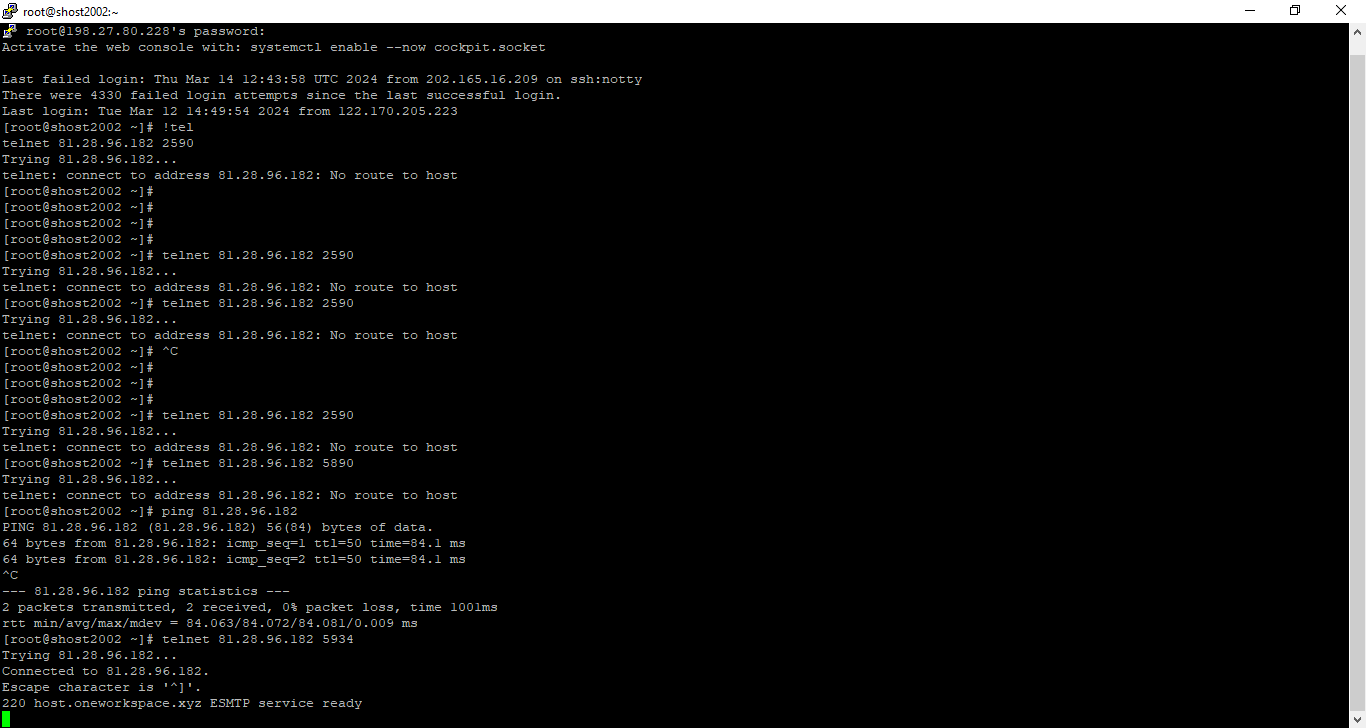
That is not a KumoMTA problem. That is a network issue.

My PMTA is connecting fairly on the same

You are running both on the same IP?

yes. on different ports

Even so, it’s still a network error, KumoMTA is not involved. It was never contacted.

What does a localhost connection look like?

localhost connection works fine

Ok, you’ll have to resolve the network issue.

PMTA is connecting from the same server

So I can conclude that there is no network issue. I think I am doing something bad

where to check logs for kumoMta ?

log directory is empty

There would be no log because the server is not connected to. The location of the logs will depend on your init.lua file.